 Print
Print Can I Have Two Google AdSense Accounts on My Website?... Yes, You Can.
If you have ever wondered once how to earn more from Google Adsense and have considered running your Google Adsense account simultaneously on several media outlets, then the answer will be Yes! This should not be confused with having more than one AdSense account, which, by the way, is illegal.
"AdSense policies only allow one account per publisher. We've provided some guidance below that may help you if you're trying to submit multiple applications to resolve an issue."... as long as you follow Google's guidelines and policies on opening such accounts.
First of all, you need to understand that for you to run a single Google AdSense publisher account on two websites, you must have direct access to both; you are not expected to own the sites, but are required to be able to add your Google AdSense publisher code snippets to the pages you require the ads to be served or displayed.

So yeah, I can have friends who have two websites each, and I have a website that has been verified for Google Adsense and liaises with my colleagues to have my code snippet published on their blogs as well.
They, on the other hand, do not need to relate further with Google or wait for a second approval or so for my ads to start displaying on their web pages.
This statement is no longer true. In 2022, you could take an approved AdSense code, paste it onto any random website, and ads would instantly appear. Google has since stopped this practice to combat ad fraud.
- The New Verification Rule: If you want to put your AdSense code on a friend's website or a shared community blog, that website must now go through an individual verification review inside your own AdSense dashboard.
- The Process: You must log into your account, click Sites, add their domain URL, and wait for Google’s automated crawlers to manually review and approve the site structure specifically for your publisher profile. If you just copy and paste the code without doing this step, the ad blocks will simply render as blank spaces.
All they need to do is make sure they follow all the guidelines on the same topic: Ads on the same page or site as another publisher. This ad serving technique and display is more similar to placing multiple ad units on the same page, but with the ad units being served by two publishers.
For those of you who might be wondering if this is a legal means of increasing your earnings on Adsense, I will like to tell you this...IT IS THE SUREST WAY TO MAKE MORE MONEY ON GOOGLE ADSENSE.
Recommended Read: How Much Traffic Do You Need To Earn $100 From AdsenseRecommended Read: How to Increase Google Adsense Earnings
For illustration purposes, I would like you to view some popular websites' Google AdSense pages and notice something peculiar about them. The only way to get the true nature of their advert placement will be to view their Google ads.txt file, also known as the Authorized Digital Seller txt file, where you are required to add your advert platform and publisher ID alongside a reference ID.
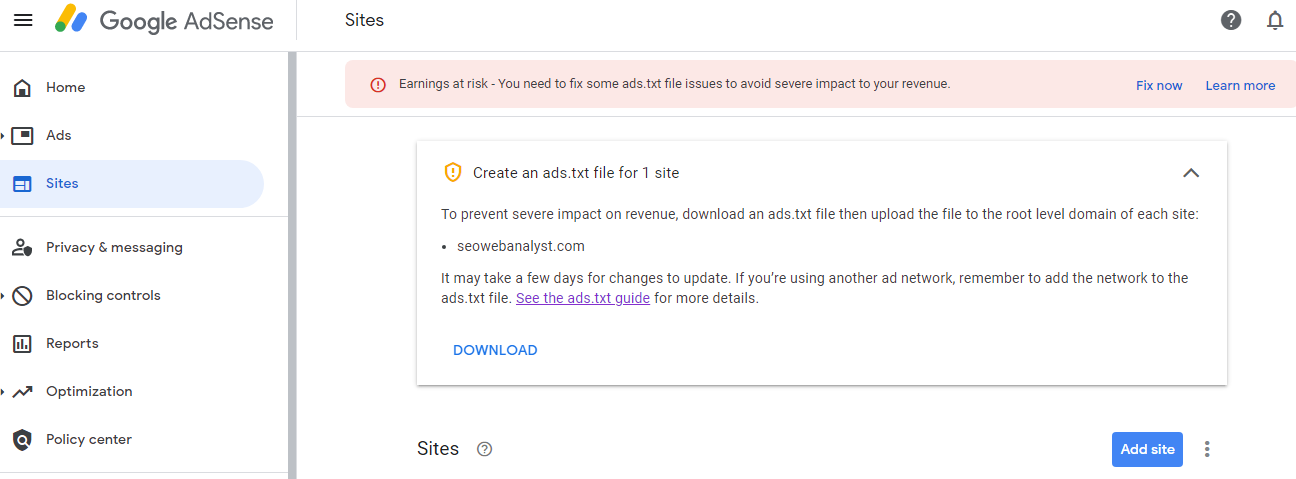
In most cases you might have logged into your Google AdSense account to see such warnings about ADS.txt file like the image below, one thing I can assure you is that to solve this you need to be very patient and will have to make sure that the file is accessible via your primary domain and also if you are serving via a directory path then make sure to place it there as well, and for more assurance have it indexed by including it in your sitemap.xml file during submission via Google search console.
Back on our topic, I would like you to check these two examples, it was posted as a question on the Google forum;
sample example sites:
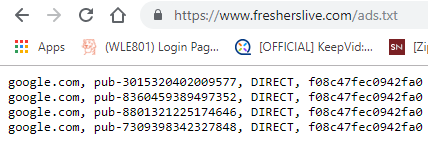
1.https://www.fresherslive.com/ads.txt
Please observe the photos below for more information.
2.http://www.bbc.co.uk/ads.txt
Please observe the photos below for more information.
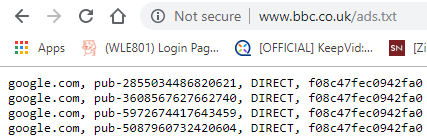
One of the explanations for this and why it is legal is simple, they have hundreds and thousands of advert serving networks and to justify this BBC for example has lots of individual writers and each with their own Google AdSense publisher ID (at least now you know why most news people like to be classified as celebrities on the internet or hot influencers with their capacity to grow followership which equates to readership and traffic) all are part of the partnership.
In this case, on each author's page for BBC, they have integrated their respective Google AdSense publisher ID to display on their pages. This is how they earn extra bucks for their articles and generate more views and traction via their social presences.
This method is somewhat similar to what we are building on (we have this with a bit of a twist), we offer our bloggers the avenue to add their already verified Google AdSense publisher ID into our platform and also offer a custom advert banner placement, this allows the blogger to earn from their AdSense and also sought out private companies or brands that want t to advertise on their blog (category) post.
Their advert placements are shown alongside our Google AdSense display as well, and certainly, we will be adding their IDs into our ads.txt file, so you see this can be a very realistic way to improve on your Google AdSense revenue in the short term.
UPDATES: Because Ads.txt authorization compliance is now heavily enforced. If you want to use your AdSense code on a shared platform today, you cannot just drop the code snippet in; you must submit the domain for approval in your AdSense dashboard and ensure the web administrator adds your unique publisher ID line to their master ads.txt file. If your publisher ID (pub-xxxxxxxxxxxx) is not physically written into the main website's ://domain.com file by the site owner, Google’s systems will automatically block ad rendering on that page.