 Print
Print WhatsApp Account Hacked “GhostPairing”: Hackers Can Hijack Your Account Without a Password
GhostPairing is an attack scam campaign launched on WhatsApp users, to secretly link your WhatsApp account to their device using fake verification codes or QR tricks. It allows the scammer or hacker to view your chat log records, including documents, links, images, and videos you share on your WhatsApp account. Unlike traditional hacks, it does not require a password or SIM swap; instead, it tricks users into authorizing the attacker’s browser as an invisible "ghost" device. The sophisticated cyberattack campaign was first reported by Indian techies and security experts' CERT-In and MeitY in early December 2025, and was dubbed WhatsApp GhostPairing due to the method of hacking WhatsApp accounts.
How Your WhatsApp Account Gets Hijacked Via GhostPairing
The scrupulous anonymous entities rely on a sequential method of stealing your WhatsApp account. Most WhatsApp Business accounts register on new devices without the owner's awareness and are the most victims of this GhostPairing, who end up finding their WhatsApp account reported as spam. Think about it, why will someone go through the trouble of registering their phone number and start spamming or sending unsolicited messages to people, knowing fully well the risk of their WhatsApp account being restricted due to spam? Well, WhatsApp Messenger Marketers are well-known culprits for this, bulk message (broadcast) to contacts and non-contacts they acquire via phishing.
The following points are how attackers use to hijack WhatsApp Business Accounts;
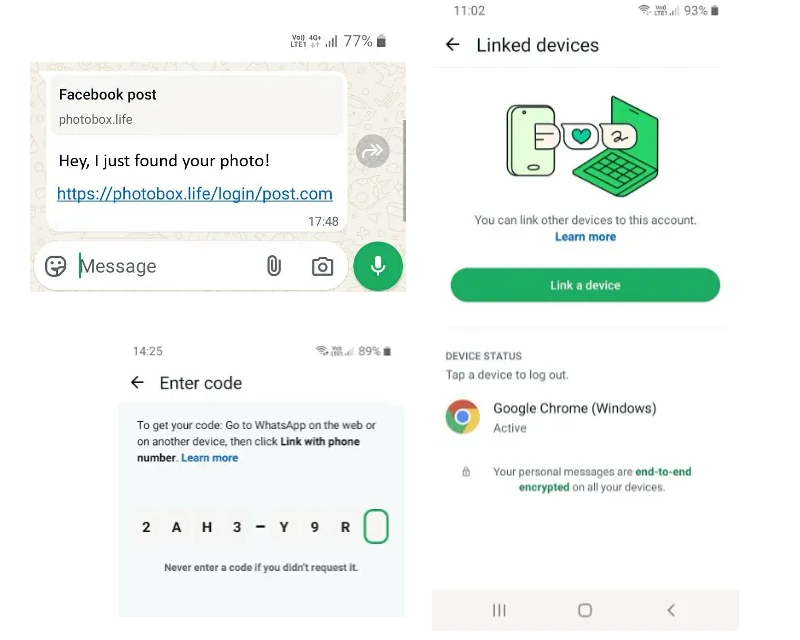
- Suspicious Message: You receive a WhatsApp message from a known contact (whose account is already compromised) saying something like, "Hey, I just found your photo!" accompanied by a link...or they disguise themselves as a well-known brand to message you with a password reset link.
- Fake Landing Page: Clicking the link takes you to a fake website designed to look like a Facebook or WhatsApp verification page. It asks you to enter your phone number to "verify" and see the photo.
- The "Ghost" Pairing:
- Once you enter your number, the attacker’s site forwards it to WhatsApp's real "Link Device via Phone Number" service.
- WhatsApp sends a legitimate 8-digit pairing code to your phone.
- The fake page displays this code to you and instructs you to enter it into your WhatsApp app to "confirm".
- Full Access: By entering that code in your app, you unknowingly link the attacker’s browser. They now have persistent, real-time access to your messages, media, and contacts without you being logged out.
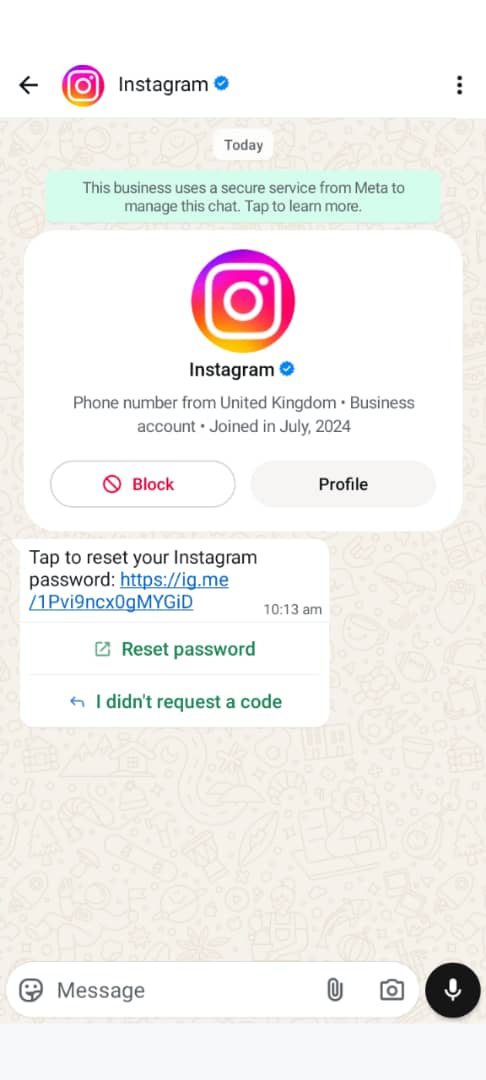
Like this image message, which was sent to me around early December, got me wondering if my Instagram account was actually getting hacked. Well, I know for a fact that I have in place all the 2-factor Authentication Security setup on my IG's account, and it will be silly for them to reach me via WhatsApp, even though I am aware Facebook owns both Instagram and WhatsApp, and they themselves have never used WhatsApp as a medium to inform me of such an attack. It has always been via email.
The approach of notifying me of such an attack was unsettling, and all I had to do was Google it.
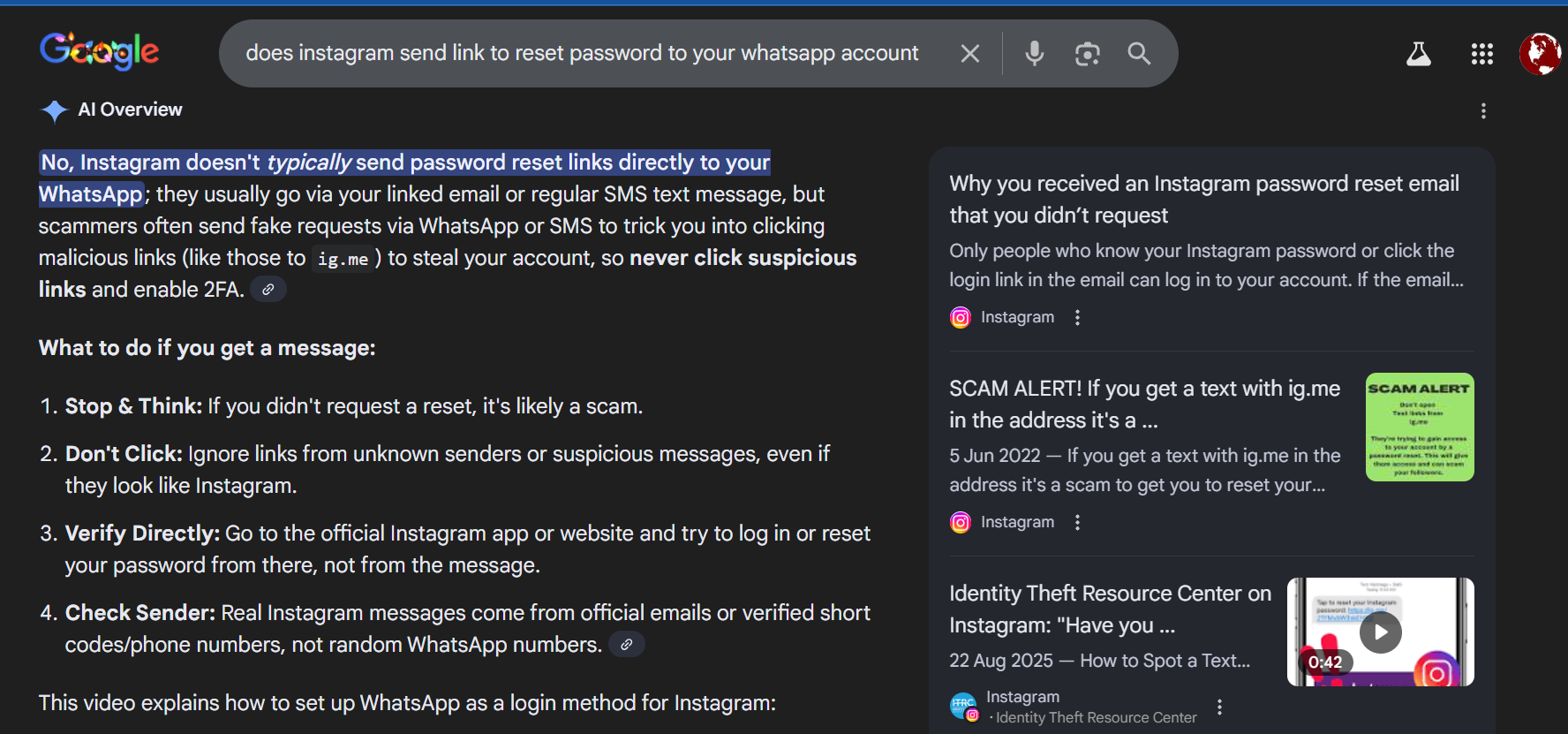
They can drop links in a group you are active in and keep spreading like a virus, hijacking people's social accounts as well as contacting you with unsolicited messages, eg, a contact you have not spoken with in ages, chatting you up for financial assistance, etc, instead of calling you directly via call.
The Danger of WhatsApp GhostPairing
- Invisible Compromise: Your phone continues to work normally, and the attacker remains hidden in the background as a linked device.
- Real-Time Monitoring: Attackers can read synced history, receive new messages as they arrive, and download private photos or voice notes.
- Snowball Effect: The hacker can use your account to send the same lure to your friends and groups, rapidly spreading the scam through trusted relationships.
How to Safeguard WhatsApp Account from GhostPairing
The following points can be used to protect your WhatsApp Business Account from hackers registering it on another device.
- Never share verification codes: WhatsApp’s 6‑digit login codes are private. Sharing them gives attackers instant access.
- Enable two‑step verification: Add a PIN in WhatsApp settings → Account → Two‑step verification. This blocks unauthorized logins.
- Check linked devices regularly: In WhatsApp → Settings → Linked Devices, review all active sessions. If you see unknown devices, remove them immediately.
- Be cautious with QR codes: Only scan QR codes inside WhatsApp itself. Ignore codes sent via email, SMS, or other apps.
- Keep WhatsApp updated: Security patches often close loopholes exploited by scammers.
- Report scam accounts or unsolicited messages from WhatsApp Account Users by clicking the three dots and selecting report from the dropdown, and blocking the account.
Here is an educational video on the subject of WhatsApp GhostPairing, courtesy VARINDA
Conclusion
The high rate of WhatsApp accounts registered on another device without the consent of their owners is becoming a scheme right now, and if the population is not well informed on steps to take to secure themselves and their privacy, this might become something of a nuisance this year. You are free to share your own personal experiences in the comment section if you were contacted by a scammer disguising themselves as a brand, like in my case, or a friend or relative whose account was hacked. Please do share this post if you find the information relevant; it might be helpful to others, such as yourself. And one more favour to ask, kindly follow me via the RSS Follow box with your verified email account. It's these little gestures that keep me writing such tantalizing articles like this, knowing I have a readership to write for and educate freely.
Sponsored content is clearly marked and reflects my honest opinions and experiences. I only promote products, services, or brands that are relevant to my audience and align with the values of this blog.
All advertising partnerships are managed in accordance with SEOWebAnalyst’s Advertising Policy. For questions, please contact me via my contact info on any of the post published.