 Print
Print llms.txt Best Practices: What is llms.txt and How to Create it for Your Website.
llms.txt is a new web standard that acts like a “robots.txt for AI,” helping large language models (LLMs) like ChatGPT, Claude, and Gemini to understand your site’s purpose, structure, and key resources. Creating one correctly improves your chances of being cited or recommended by AI systems, overall improving your website AI visibility. The llms.txt file, originally proposed by Answer.ai as a proposed Markdown file placed at the root of your site to help large language models understand your content, find the most useful pages, and use your website more effectively at inference time. It is similar in context to a sitemap, but instead of listing pages for search engines, it highlights the pages and resources that matter most to AI tools.

Image courtesy: Succinctideas.com.au
What is llms.txt?
At its core, llms.txt is a plain-text Markdown file located at the root of your website (e.g., yoursite.com/llms.txt). While robots.txt tells crawlers where they can go, llms.txt provides them with a high-density, structured summary of what is on the site and how to find the most relevant information.
It serves as a "landing page" for LLMs, offering:
- A high-level summary of the website's purpose.
- A curated list of links to the most important pages (documentation, guides, APIs).
- Concise descriptions for each link to help the model decide what to read next.
Why Your Website Needs an llms.txt File
As AI-powered search engines like Perplexity, SearchGPT, and Claude's analysis tools become more prevalent, the way your site is "read" is changing. Here’s why llms.txt is essential:
- Improved Accuracy: By providing a structured overview, you reduce the risk of an LLM hallucinating information about your product or service.
- Reduced Token Usage: LLMs have limited "context windows." A well-structured llms.txt allows them to find the exact information they need without having to crawl and process every single page on your site.
- AEO (Answer Engine Optimization): Just as SEO helps you rank on Google, llms.txt helps you be more "findable" and "citeable" by AI models, ensuring your brand is represented accurately in AI-generated answers.
- Efficiency for AI Agents: Autonomous agents can use this file as a roadmap, making them much faster at performing tasks on your behalf (like finding documentation or troubleshooting steps).
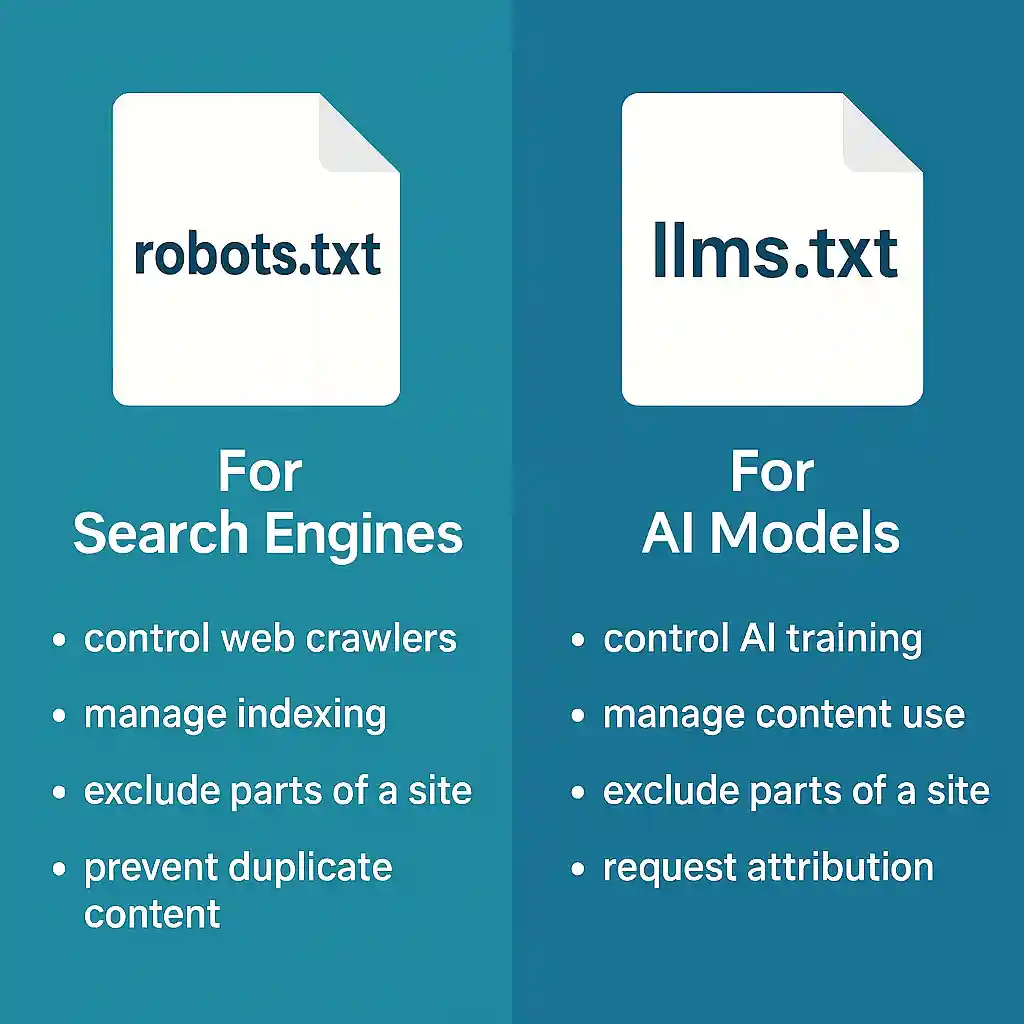
Image courtesy: Succinctideas.com.au
llms.txt Best Practices
To make your llms.txt file as useful as possible, follow these industry-standard best practices:
1. Use Clean Markdown
The file should be written in standard Markdown. Keep it simple—avoid complex tables or excessive formatting that might confuse a basic parser.
2. Structure with Clear Headings
Use # for the main title (usually your site name) and ## for categories (e.g., ## Core Documentation, ## API Reference).
3. Provide Concise Summaries
Each link should be followed by a one-sentence description. Avoid marketing fluff; focus on technical accuracy and utility.
• Bad: [Our Amazing Blog](https://site.com/blog) - Read the best content in the world!
• Good: [Technical Blog](https://site.com/blog) - Deep dives into our system architecture and weekly updates.
4. Use the "llms-full.txt" Extension (Optional but Recommended)
For sites with massive amounts of data, you can create a secondary file called llms-full.txt. The main llms.txt serves as a concise index, while llms-full.txt can contain more exhaustive lists or even the full text of key documents for RAG (Retrieval-Augmented Generation) systems.
5. Keep It Updated
Just like your sitemap, your llms.txt should reflect the current state of your site. If you add a major new feature or documentation section, update the file immediately.
What NOT to Include
- Low-quality content (e.g., less than 500-word posts)
- Product pages that redirect to checkout pages
- Content that is not rich in semantic keywords
- Promotional landing pages or conversion-only funnels
- Duplicate content or unoriginal blog reposts
This isn't a place to boost everything — it's a curated source for what you want AI to read, learn, and summarize. For an extended version with more detail and optional resources, you can consider the llms-full.txt; It is everything that comes with the llms.txt file, but with expanded product description and the following;
Expanded product descriptions
Optional external documents (PDFs, Google Drive links, case studies)
Release notes, tutorials, academy/training links
Competitive positioning or sales pitch material
Its AI engine's use cases are as follows;
Provides AI systems with deeper context when they need more than just a summary.
Useful for complex SaaS platforms or sites with multiple modules/features.
The llms-full.txt best practice includes richer descriptions, but avoid marketing fluff; keep it factual and structured.
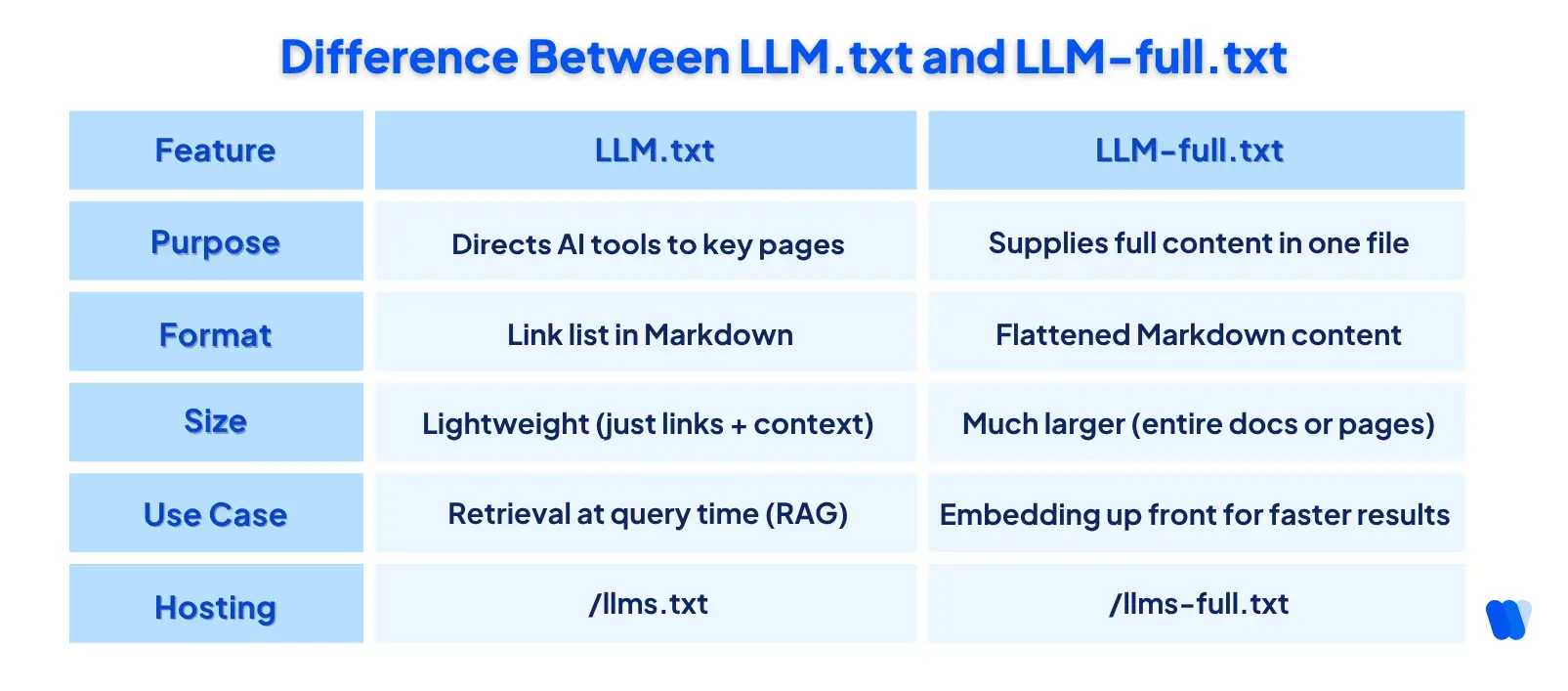
The Difference-Between-LLM.txt-and-LLM-full.txt Image courtesy: wellows.com
Common mistakes
Do not copy your full sitemap into llms.txt. Do not add unnecessary HTML, scripts, or formatting noise. Do not let the file go stale, because outdated links or descriptions reduce its usefulness. Also, do not confuse it with a crawl-control file; it is meant for guidance, not access restriction.
How to Create Your llms.txt File
Creating the file is straightforward. You can do it manually or use automated tools.
Manual Creation Example;
Create a file named llms.txt and add content similar to this:
# MySite
> A SaaS platform for SEO audits and content automation.## Core Pages
- https://mysite.com/ : Homepage overview
- https://mysite.com/pricing : Subscription tiers and limits
- https://mysite.com/blog : Articles on SEO and marketing## Features
- https://mysite.com/seo-audit : Technical SEO audits
- https://mysite.com/social-tools : Social media automation
- https://mysite.com/qr-generator : Dynamic QR code creation## Account
- https://mysite.com/login : User login
- https://mysite.com/register : New account signup## Learning Resources
- https://mysite.com/docs : Documentation
- https://mysite.com/tutorials : How-to guides
This is a sample llms.txt file you can expand on for your website.
Automated llms.txt File Generation
Several tools have emerged to help you generate these files automatically by crawling your sitemap or documentation:
- Mintlify: Offers a free llms.txt generator.
- Firecrawl: Can crawl your entire site and output a structured llms.txt.
- GitBook: Has built-in support for generating these files for your documentation sites.
Final Thoughts
We’re stepping into a new era where SEO isn’t just about pleasing crawlers, it’s about being clearly understood by AI. llms.txt gives your site a voice in the age of large language models, offering a structured, curated snapshot of what you do best.
From shaping how ChatGPT summarizes your guides to influencing which URLs appear in AI‑powered search overviews, llms.txt is the blueprint for visibility in a world driven by generative answers.
Recommended Read: AI Optimization vs Search Engine Optimization(SEO)
Recommended next step
If you want to implement it quickly, create a simple root-level llms.txt. List your top 5 to 15 most useful pages, and test whether the file reads clearly to a human first. If the content is easy for a person to understand, it is usually easier for an LLM too.