 Print
Print How To Set up Live Social Proof Review for a Website
We have addressed how to set up Live Sign-up Count and Live website visit count in a previous post. This article will focus solely on how to set up the Live Review social proof count, but if you are interested in either of the previous live data pop-up widgets, you can find their post via How To Set Up Website Fomo Notifications and How To Set Up Live Website Count Notification, and on that note I will skip most of the formal introduction and go straight to the point.
When you are on the data tab page for the live review, you will need a webhook to collect data for the live review. How do you code it with a form to display the live feedback from your users on the widget interface via Send a POST request with form data parameters to add a new conversion dynamically. You must use the available & required fields: title, description, image, image_alt, and star if you want the live review social proof widget to execute properly.
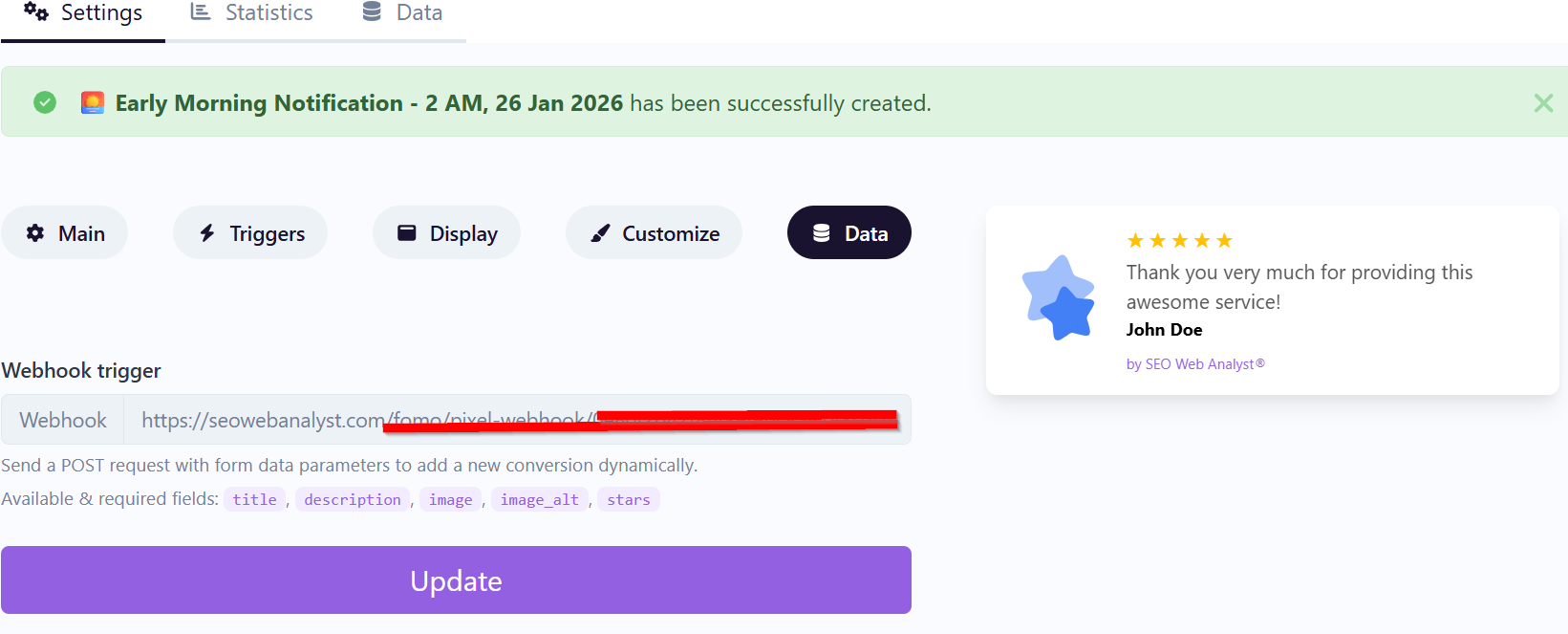
If you reach the stage as seen in the image above, and have also installed your pixel code for this live review, simply follow the steps illustrated below;
Step 1: Prepare Your Webhook Endpoint
Simply copy the code in the webhook trigger as seen above.
Step 2: Build the HTML Form
You’ll need a form on your site where users can submit their reviews.
Required fields: title, description, image, image_alt, stars
Step 3: Send Data via JavaScript (Optional AJAX)
Instead of a direct form POST, you can use JavaScript to send the data asynchronously:
<script>

document.getElementById("reviewForm").addEventListener("submit", function(event) {

  event.preventDefault(); // Prevent normal form submission
// Collect form data

  const formData = {

    title: document.querySelector("[name='title']").value,

    description: document.querySelector("[name='description']").value,

    image: document.querySelector("[name='image']").value,

    image_alt: document.querySelector("[name='image_alt']").value,

    stars: document.querySelector("[name='stars']").value

  };
// Send POST request via fetch

  fetch("https://yourdomain.com/fomo/webhook/xxxxxxxx", {

    method: "POST",

    headers: {

      "Content-Type": "application/json"

    },

    body: JSON.stringify(formData)

  })

  .then(response => {

    if (response.ok) {

      alert("Review submitted successfully!");

    } else {

      alert("Error submitting review.");

    }

  })

  .catch(error => {

    console.error("Error:", error);

    alert("Network error. Please try again.");

  });

});

</script>
Step 4: How The Live Review Uses It
- Each POST request creates a new conversion event in the Live Review Social Proof.
- The widget will then display the review live (title, description, image, alt text, stars).
- This makes your reviews appear as real‑time social proof notifications on your site.
Example Payload (What’s Sent)
Here’s what the POST request sends:
{ "title": "Great Service!", "description": "I loved the fast delivery and support.", "image": "https://example.com/user-photo.jpg", "image_alt": "Photo of reviewer", "stars": "5" }
Best Practices
• Validate inputs (e.g., stars must be 1–5).
• Host reviewer images securely (avoid broken links).
• Moderate reviews before displaying them live if needed.
• Use HTTPS for the webhook endpoint to keep data secure.
Bottom Line: You create a form → send a POST request with → Live Review webhook ingests it → your site shows the review dynamically as a conversion notification.
Conclusion:
Follow this as your guideline when you want to establish a live review and dynamic display of social proof to your website visitors. Overall, you can deploy the niftty social proof widget to easily persuade users of the reviews you have from other real-life users of the product or service.
Sponsored content is clearly marked and reflects my honest opinions and experiences. I only promote products, services, or brands that are relevant to my audience and align with the values of this blog.
All advertising partnerships are managed in accordance with SEOWebAnalyst’s Advertising Policy. For questions, please contact me via my contact info on any of the post published.